Metadata
SolarNode supports a flexible JSON metadata format that various components make use of in a variety of ways. The metadata is stored in the SolarNetwork cloud and available through the SolarNetwork API and also within SolarNode. There are three main places metadata can be configured:
| Location | Description |
|---|---|
| User account | Account-wide metadata that can be used by any component on any node with appropriate security token credentials configured. |
| Node | Node-specific metadata that can be used and updated by the node it is associated with, without any additional authentication. |
| Source (datum stream) | Source ID-specific datum stream metadata (and thus also node-specific) that can be used and updated by the node associated with the stream, without any additional authentication. |
Metadata structure
| Property | Type | Description |
|---|---|---|
m |
Map<String, Object> | An arbitrary single-level object data structure. Traditionally this is meant to be used as a single-level key/value pair style object. |
pm |
Map<String, Map<String, Object>> | An arbitrary multi-level object of objects data structure. Traditionally this is meant to be used as an arbitrary tree of key/value pairs and values. |
t |
String[] | An array of strings to be treated as a set of tags. Duplicate values are discarded. |
Here is an example of node metadata. The metadata is both read by and published from the node, as explained in the
{
    "m": {
        "ssh-public-key": "ssh-ed25519 AAAAC3Nza...7MD SolarNode" // (1)!
    },
    "pm": {
        "os": { // (2)!
            "arch": "aarch64",
            "name": "Mac OS X",
            "version": "15.7.4"
        },
        "cpd": {
            "schedule": [ // (3)!
                ["Month","Day","Weekday","Time","cpdPeriodActive"],
                ["Jan-Apr,Oct-Dec",,,,0],
                ["May-Sep",,,,1]
            ]
        },
        "setup": {
            "s3-version": "0000000000000010101" // (4)!
        },
        "power-manager": {
            "prod": {
                "parameters": { // (5)!
                    "MIN_MARGIN": 0.14,
                    "IE_MAX_RATE": 10,
                    "IE_MIN_RATE": 1,
                    "EXP_INPUT_MAX": 4,
                    "EXP_INPUT_MIN": 0,
                    "USE_GRID_PRICE": 0.150,
                    "LOW_PRICE_IMPORT": 0.01,
                    "HIGH_DEMAND_THRESHOLD": 10,
                    "LOW_BATTERY_THRESHOLD": 0.25,
                    "CHARGED_BATTERY_THRESHOLD": 0.75
                }
            }
        },
        "pv-characteristics": { // (6)!
            "alt": 10,
            "lat": 41.1801547,
            "lon": -73.83277369999999,
            "zone": "America/New_York",
            "maxZenith": 83,
            "panelArea": 2242.25,
            "pvArrayTilt": 7,
            "minCosZenith": 3,
            "pvArrayAzimuth": 205,
            "degradationRate": 0.0063,
            "panelEfficiency": 0.192,
            "performanceRatio": 0.84,
            "transpositionModel": "perez-driesse",
            "nameplateAcMaxPower": 333300,
            "panelArrayTiltFactor": 1,
            "pvArrayCommissionDate": "2021-12-22"
        }
    }
}
- SSH public key published by SolarNode itself.
- General OS metadata published by the OS Statistics component.
- A tariff schedule that can be used, for example, by the Fixed Data and Tariff Filter components.
- Version published by the S3 Setup plugin.
- Parameters used in node expressions to implement dynamic load management.
- Parameters used by the POAI Calculator component.
Metadata paths
When working with metadata, you will invariably need to specify a specific part of the metadata for
a component to work with. This is done using a metadata path syntax that works like a URL path.
The path starts with / and each path component represents an object in the metadata hierarchy
structure. When viewing the metadata as JSON, objects are written using curly braces: { }.
The JSON object properties represent components in the metadata path synax.
Using the example metadata JSON in the previous section, here are some example metadata paths:
| Path | Referenced value |
|---|---|
/m/ssh-public-key |
The node's publish SSH key. |
/pm/os/arch |
The node's CPU architecture, as published by the OS Statistics component. |
/pm/cpd/schedule |
An array of arrays, representing a tariff schedule. This could be used by the Tariff Filter, for example. |
/pm/pv-characteristics |
A parameters object. This could be used by the POAI Calculator, for example. |
User Metadata Service
SolarNode provides support for accessing user metadata with the User Metadata Service component. You can configure any number of these components from the Settings > Components page, where it appears like this:

User Metadata Service settings
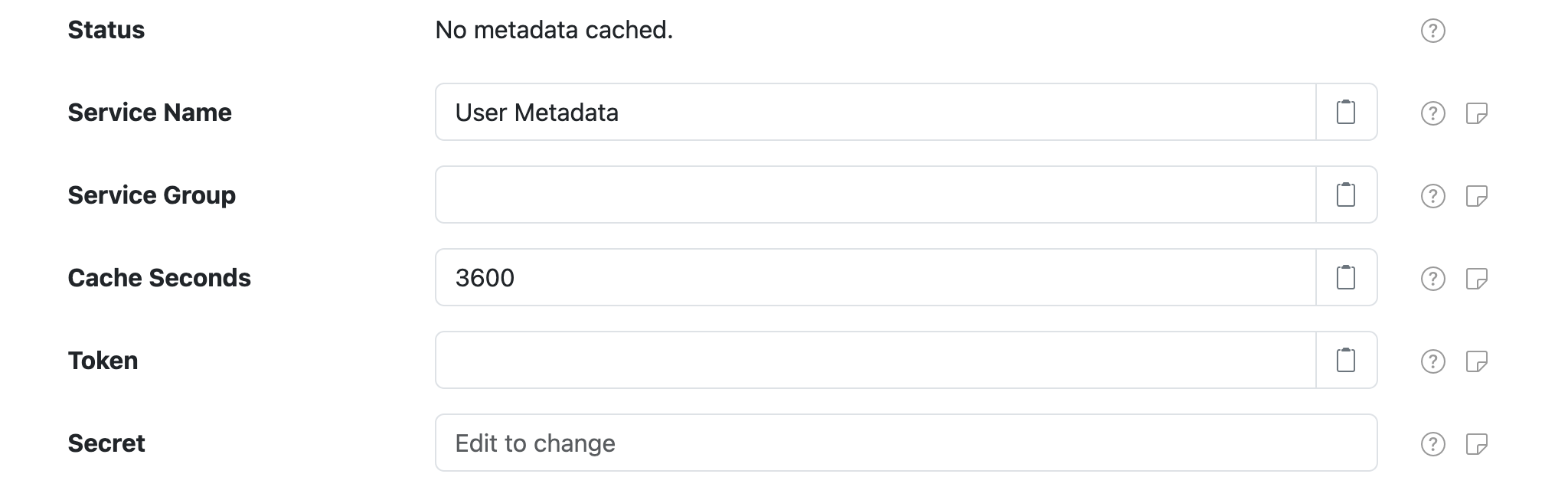
Each component supports the following settings:
| Setting | Description |
|---|---|
| Service Name | A unique ID for the service, to be referenced by other components. |
| Service Group | An optional service group name to assign. |
| Cache Seconds | The number of seconds to cache the metadata after fetching from SolarNetwork, before fetching it again when metadata is requested. |
| Token | A SolarNetwork security token. See User Metadata security token for more info. |
| Secret | The SolarNetwork security token secret. |
User Metadata security token
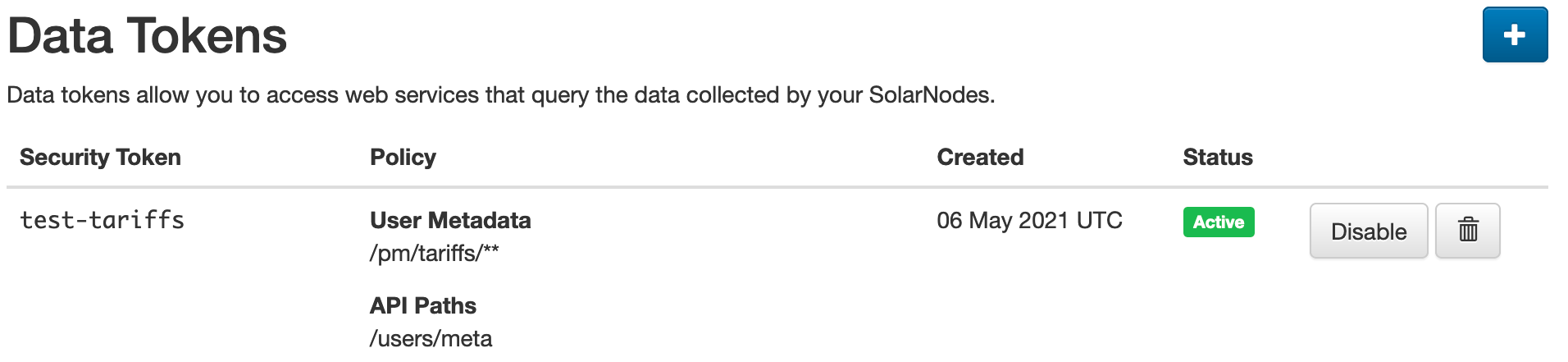
You must configure a SolarNetwork security token to use the User Metadata Service. We
recommend that you create a Data security token with a security policy that includes an API
Path of just /users/meta and a User Metadata Path of something granular to restrict the
metadata SolarNode has access to. For example, a policy User Metadata Path of /pm/tariffs/** would
restrict SolarNode's access to just the metadata under the /pm/tariffs metadata path.
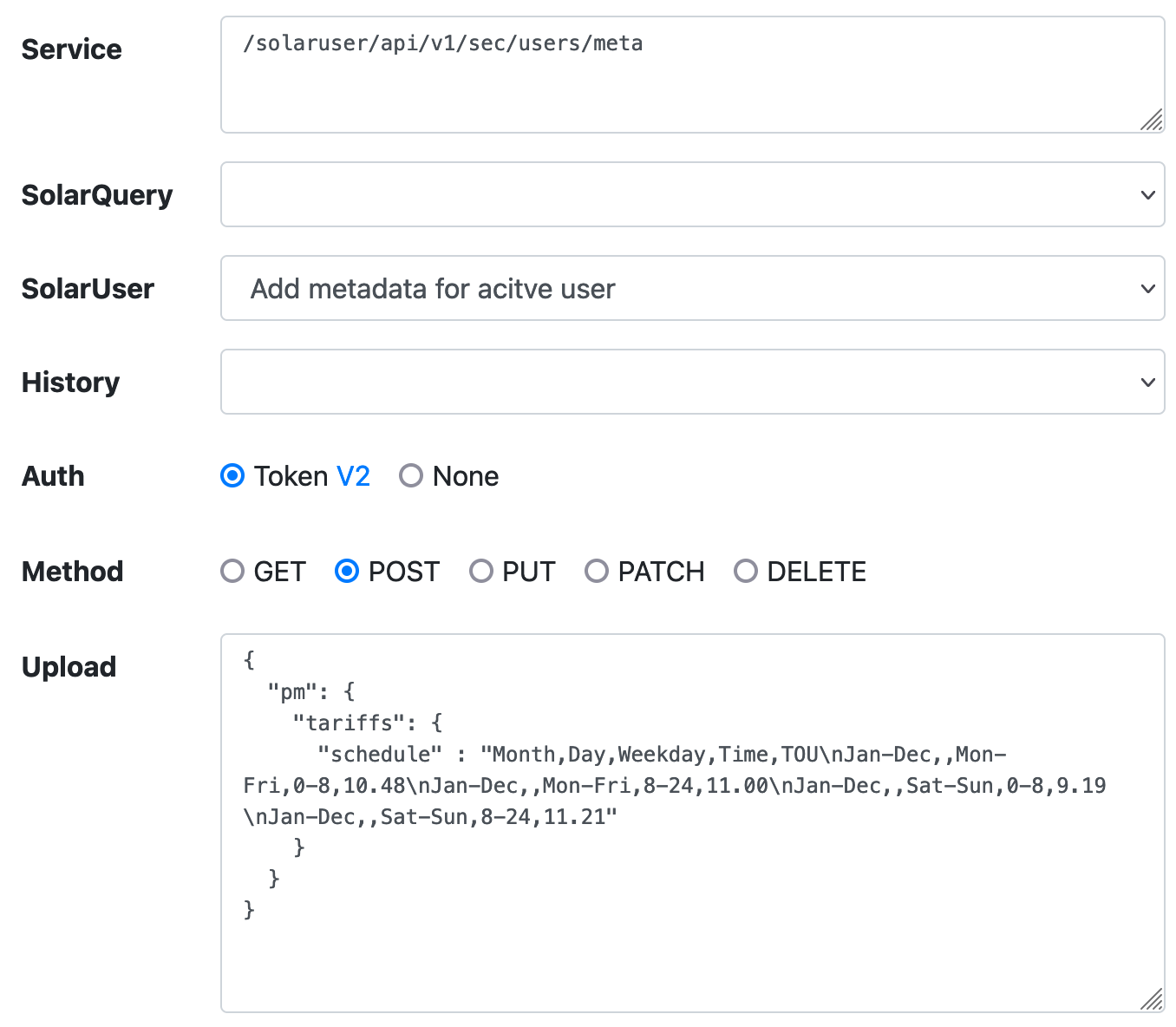
The SolarNetwork API Explorer can be used to add the necessary tariff schedule metadata to your account. For example:
Node Metadata Service
SolarNode provides support for accessing node metadata with the Node Metadata Service service name. This component is automatically available, and can be configured on the Settings > Services page, where it appears as Node Metadata Service (SolarNet).
Node Metadata Service settings
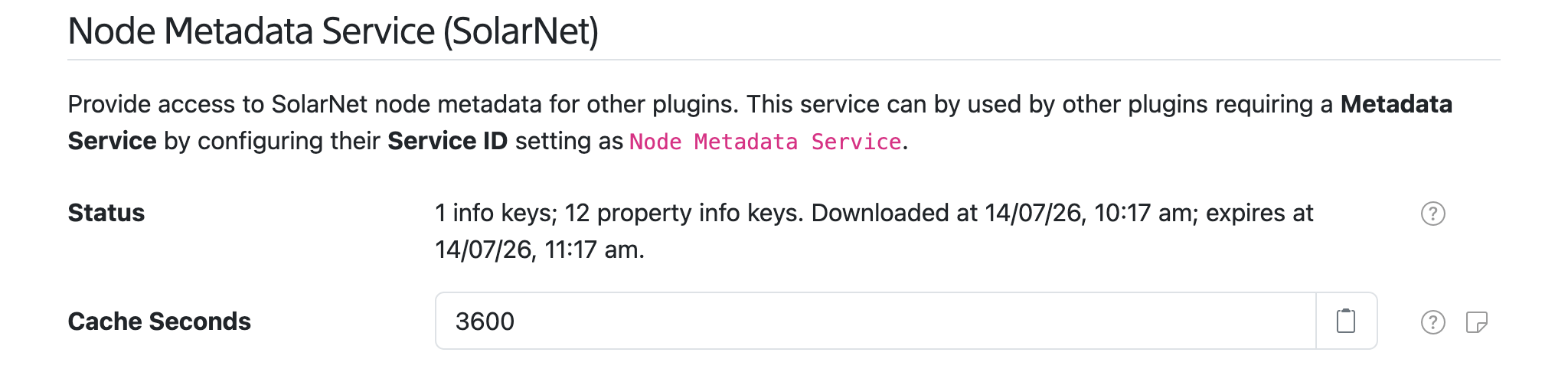
The service supports the following settings:
| Setting | Description |
|---|---|
| Cache Seconds | The number of seconds to cache the metadata after fetching from SolarNetwork, before fetching it again when metadata is requested. |
Source Metadata Service
All Datum Sources support publishing source-level metadata, and datum expressions can access this as well. This service can be configured on the Settings > Services page, where it appears as Source Metadata Service (SolarNet).
Source Metadata Service settings

The service supports the following settings:
| Setting | Description |
|---|---|
| Persist Seconds | A minimum number of seconds between metadata updates to wait before persisting locally. This helps minimize disk writes. |
| Sync Seconds | A minimum number of seconds between metadata updates to wait before persisting to SolarNetwork. This helps minimize network traffic. |
Clearing the Source Metadata cache
Source metadata can be cleared by sending a DatumSourceMetadataClearCache
instruction to the node.