Control Conductor
The Control Conductor component can schedule a set of control changes in response to an
OrchestrateControls instruction. For example,
this could be used to execute a hot-water load shift scenario like:
- in 1 hour turn the hot water thermostat up by 10℃
- in 2 hours turn the hot water cylinder off
- in 4 hours turn the hot water thermostat down by 10℃ and turn the hot water cylinder on
At a high level, the Control Conductor is configured with a set of tasks that each specify a
control to update and when to update it, relative to an orchestration date. The
OrchestrateControls instruction specifies which Control Conductor component to execute and the
orchestration date to execute at.
This component is included in the solarnode-app-control-core package in SolarNodeOS. You can install this package on the System > Packages page in SolarNode.
Use
Once installed, a new Control Conductor component will appear on the Settings > Components page on your SolarNode. Click on the Manage button to configure components.

Settings
Each component configuration is specific to a single orchestration sequence.

The configuration contains the following overall settings:
| Setting | Description |
|---|---|
| Service Name | A required unique name to identify this component with. |
| Service Group | An optional group name to associate this component with. |
| Predicate Expression | An optional expression that must evaluate to true for the task configurations to be evaluated when an OrchestrateControls instruction is handled. This can be useful if the OrchestrateControls instruction was deferred, to re-check that the runtime is in an expected state. |
| Predicate Expression Language | The expression language Predicate Expression is written in. |
| Task Configurations | A list of control task-specific settings. Any number of task configurations can be added. |
Task settings
You must configure task settings for each control you want to change when the OrchestrateControls
instruction is handled. You can configure as many property settings as you like, using the
+ and - buttons to add/remove configurations.
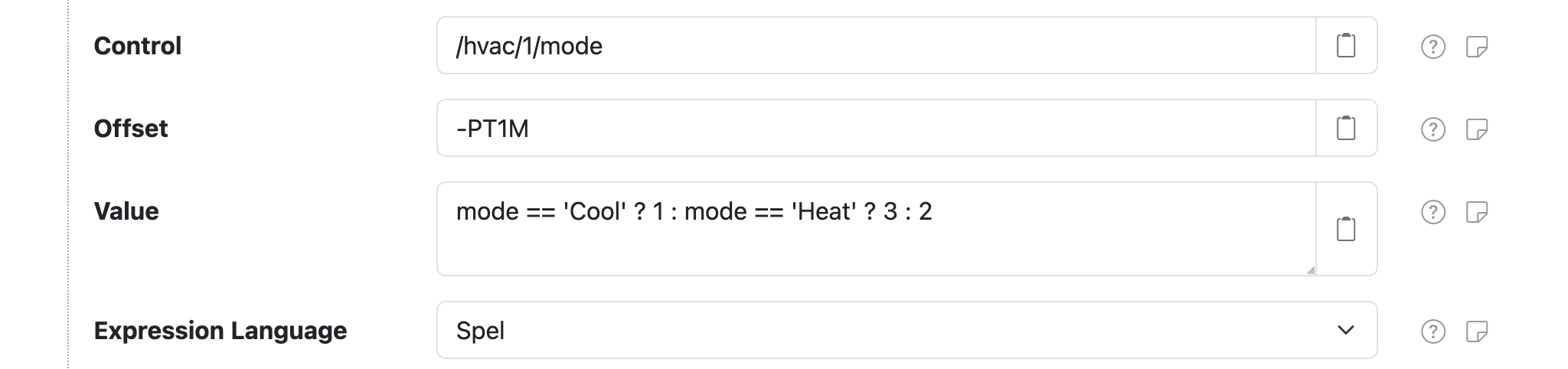
Each task configuration contains the following settings:
| Setting | Description |
|---|---|
| Control | The ID of the control to change. Parameters provided by the OrchestrateControls instruction can be used as placeholders. |
| Offset | The time offset, relative to the orchestration date, to change the control value at. Negative values are supported and represent an offset before the orchestration date. Parameters provided by the OrchestrateControls instruction can be used as placeholders. |
| Value | The control value to set. Parameters are supported. If Expression Language is configured then treat as an expression to evaluate. Parameters provided by the OrchestrateControls instruction can be used as placeholders, as normal placeholders or if an expression is used then in the expression directly as variables. |
| Expression Language | The expression language to write Value in. If not configured then Value will not be treated as an expression. |
Task settings Offset syntax
The Offset setting accepts duration values that can be specified in a couple of different ways:
- an integer millisecond value, for example
60000for 1 minute after or-10000for 10 seconds before - an ISO 8601 duration value in the form
PnDTnHnMn.nS, wherenis a number, for examplePT1H30Mfor 90 minutes after or-PT0.5Sfor 0.5 seconds before
OrchestrateControls instruction
The OrchestrateControls instruction is used to execute the task schedule defined in a Control
Conductor component. It requires the following parameters:
| Parameter | Description |
|---|---|
service |
The Service Name of the Control Conductor to execute. |
date |
The orchestration date to execute the task schedule at. |
The date parameter can be specified as an Unix millisecond epoch integer like 1680664200000 or
an ISO 8601 instant like 2023-04-05T03:10:00.
OrchestrateControls instruction extra parameters
Any parameter included in the OrchestrateControls instruction will then be available as a
placeholder for use in any configured task Control, Offset, and Value settings. If
Value is configured as an expression, then the parameters will be available directly within the
expression.
CancelInstruction support
The CancelInstruction instruction can be used
to cancel a previously executed OrchestrateControls instruction. All the scheduled "child"
task instructions issued by the "parent" OrchestrateControls instruction will be cancelled
if the "parent" instruction ID is provided in the CancelInstruction instruction.
Expressions
The task Value can be defined as an expressions if the Expression Language setting
is also configured. The expression will have access to all the parameters provided by the
OrchestrateControls instruction.
Example: HVAC Demand Response
This section shows an example use case of the OrchestrateControls instruction that is supported by
the Control Conductor component. At a high level, the goal of this example is to schedule a "demand
response event" where a "mode" is adjusted on some device, several times over a fixed duration. You
can think of this as a sequence of "mode" changes, where the mode changes from 0 → 3 → 4 → 0
over time.
A Control Conductor component named HVAC DR is configured with 3 tasks that execute at an
orchestration date specified in the OrchestrateControls instruction:
- 1 minute before the orchestration date, set
/hvac/1/modeto1,2, or3based on an expression using themodeparameter in theOrchestrateControlsinstruction - at the orchestration date, set
/hvac/1/modeto4 - X minutes after the orchestration date, as defined by a
durationparameter in theOrchestrateControlsinstruction, set the/hvac/1/modeto0
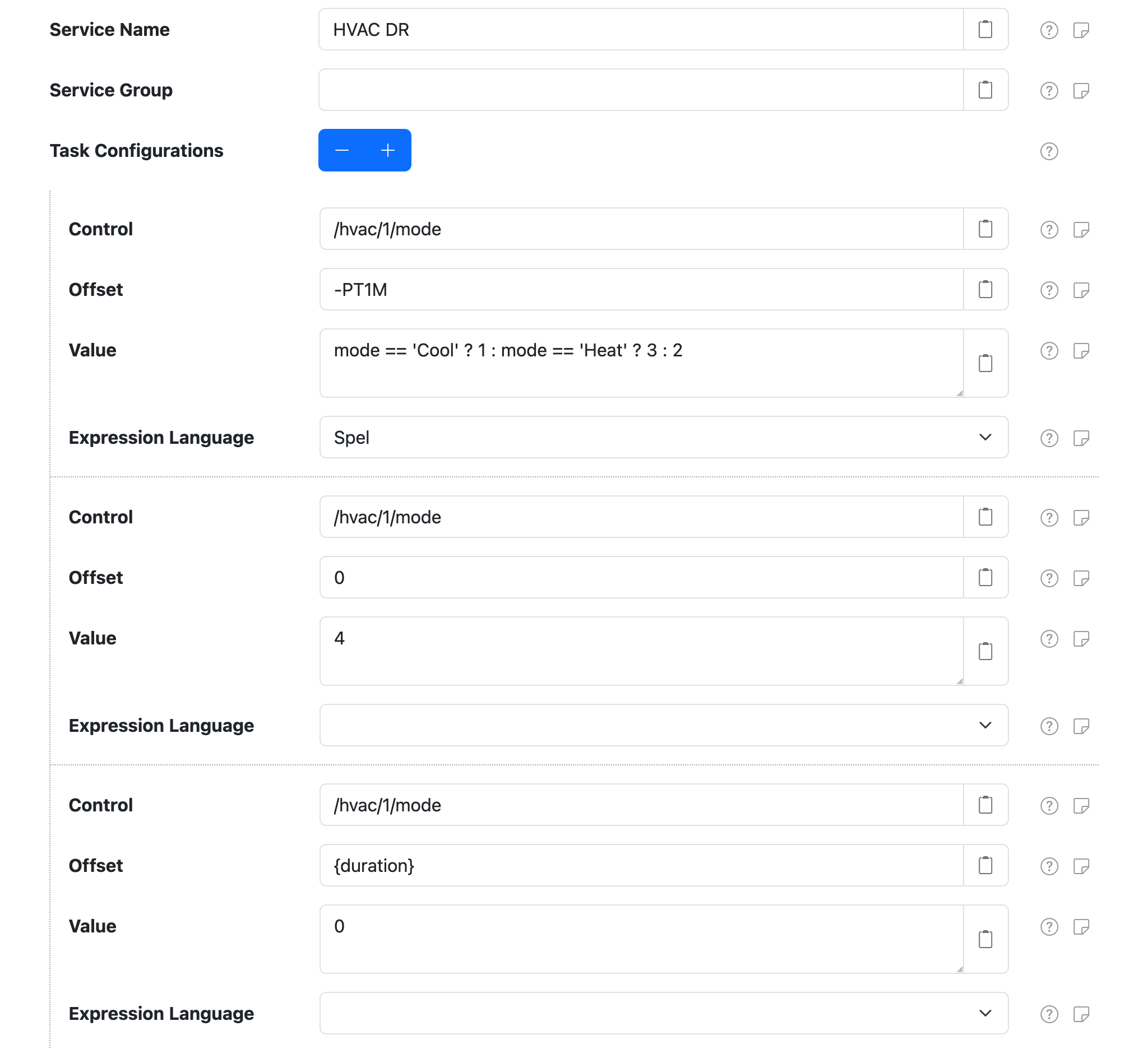
The following sections detail a concrete example of issuing an OrchestrateControls instruction
using this configuration.
Post OrchestrateControls instruction
First a OrchestrateControls instruction is issued using the /instr/add SolarNetwork API, passing
in the following parameters:
| Parameter | Value | Description |
|---|---|---|
service |
HVAC DR |
The Service Name of the Control Conductor to trigger. |
date |
2023-04-05T03:10:00Z |
The orchestration date to use; essentially some date in the future. |
mode |
Heat |
This is provided so task 1's Value expression can decide what value to set on the /hvac/1/mode control. |
duration |
PT1M |
The desired duration used by task 3's Offset parameterized value. |
{"nodeId":123, "topic":"OrchestrateControls", "params":{
  "service"  : "HVAC DR", // (1)!
  "date"     : "2023-04-05T03:10:00Z", // (2)!
  "mode"     : "Heat", // (3)!
  "duration" : "PT1M" // (4)!
}}
- This is the Service Name of the Control Conductor component to trigger.
- The orchestration date to use.
- An extra parameter to pass to the tasks. In this case the
modevariable is used in task #1's Value expressionmode == "Cool" ? 1 : mode == "Heat" ? 3 : 2. - An extra parameter to pass to the tasks. In this case the
{duration}placeholder is used in task #3's Offset setting.
SolarNode receives the OrchestrateControls instruction
Here are logs from SolarNode, after receiving the OrchestrateControls instruction:
15:07:17 INFO  Instruction 11537521 OrchestrateControls received with parameters: {service=HVAC DR, mode=Heat, date=2023-04-05T03:10:00Z, duration=PT1M}
15:07:17 INFO  Posted Instruction 11537521 [OrchestrateControls] acknowledgement status: Executing
15:07:17 INFO  Scheduling Signal instruction on behalf of OrchestrateControls instruction [11537521] task [HVAC DR.1] @ 2023-04-05T03:09:00Z
15:07:17 INFO  Scheduling Signal instruction on behalf of OrchestrateControls instruction [11537521] task [HVAC DR.2] @ 2023-04-05T03:10:00Z
15:07:17 INFO  Scheduling Signal instruction on behalf of OrchestrateControls instruction [11537521] task [HVAC DR.3] @ 2023-04-05T03:11:00Z
15:07:17 INFO  Posted Instruction 11537521 [OrchestrateControls] acknowledgement status: Completed
These logs show that SolarNode received the OrchestrateControls instruction and then scheduled
3 future-dated Signal instructions, one for each task configured on the Control Conductor. The
Control Conductor knows how to handle these particular Signal instructions. Notice the dates of
each of the Signal instructions:
...task [HVAC DR.1] @ 2023-04-05T03:09:00Z
...task [HVAC DR.2] @ 2023-04-05T03:10:00Z
...task [HVAC DR.3] @ 2023-04-05T03:11:00Z
Those dates are based on the orchestration date and {duration} parameter provided in the
OrchestrateControls instruction:
| Task | Time | Description |
|---|---|---|
HVAC DR.1 |
03:09:00Z |
This is 1 minute before the orchestration date, because the task's Offset was configured as -PT1M (minus 1 minute). |
HVAC DR.2 |
03:10:00Z |
This is on the orchestration date, because the Offset was configured as 0 (0 milliseconds). |
HVAC DR.3 |
03:11:00Z |
This is 1 minute after the orchestration date, because the task's Offset was configured as {duration} and the duration parameter value was specified as PT1M (plus 1 minute) in the original OrchestrateControls instruction. |
Orchestration date T-1 minute
15:09 local time, which is 03:09Z, is 1 minute before the orchestration date. SolarNode executes
task 1, evaluating the Value expression and setting the /hvac/1/mode control to 3. In the
following logs we can see SolarNode write 3 to a Modbus holding register 2:
15:09:49 INFO  Executing SetControlParameter instruction for orchestrated task [HVAC DR.1] to set control [/hvac/1/mode] to [3]
15:09:49 INFO  Setting /hvac/1/mode value to 3
15:09:49 TRACE Wrote 1 Holding values to 2 @ localhost:5552#1: 00 03
15:09:49 INFO  Instruction 1680664015581 [SetControlParameter] state changed to Completed
15:09:49 INFO  Instruction 1680664015578 Signal status changed to Completed
Orchestration date
At 15:10 local time, which is 03:10Z, SolarNode executes task 2, setting /hvac/1/mode to 4.
In the following logs we can see SolarNode write 4 to Modbus holding register 2:
15:10:49 INFO  Executing SetControlParameter instruction for orchestrated task [HVAC DR.2] to set control [/hvac/1/mode] to [4]
15:10:49 INFO  ModbusControl - Setting /hvac/1/mode value to 4
15:10:49 TRACE Wrote 1 Holding values to 2 @ localhost:5552#1: 00 04
15:10:49 INFO  Instruction 1680664015582 [SetControlParameter] state changed to Completed
15:10:49 INFO  Instruction 1680664015579 Signal status changed to Completed
Orchestration date T+1 minute
At 15:11 local time, which is 03:11Z, SolarNode executes task 3, setting /hvac/1/mode to 0.
In the following logs we can see SolarNode write 0 to Modbus holding register 2::
15:11:49 INFO  Executing SetControlParameter instruction for orchestrated task [HVAC DR.3] to set control [/hvac/1/mode] to [0]
15:11:49 INFO  Setting /hvac/1/mode value to 0
15:11:49 TRACE Wrote 1 Holding values to 2 @ localhost:5552#1: 00 00
15:11:49 INFO  Instruction 1680664015583 [SetControlParameter] state changed to Completed
15:11:49 INFO  Instruction 1680664015580 Signal status changed to Completed