Instructor Datum Filter
This component provides a way to issue dynamic node-local instructions based on expressions. A predicate expression is evaluated to conditionally issue a set of associated instructions with a set of dynamic parameters.
Info
This filter is provided by the Standard Datum Filters plugin, which is provided by the
solarnode-app-datumfilters
package in SolarNodeOS.
Settings
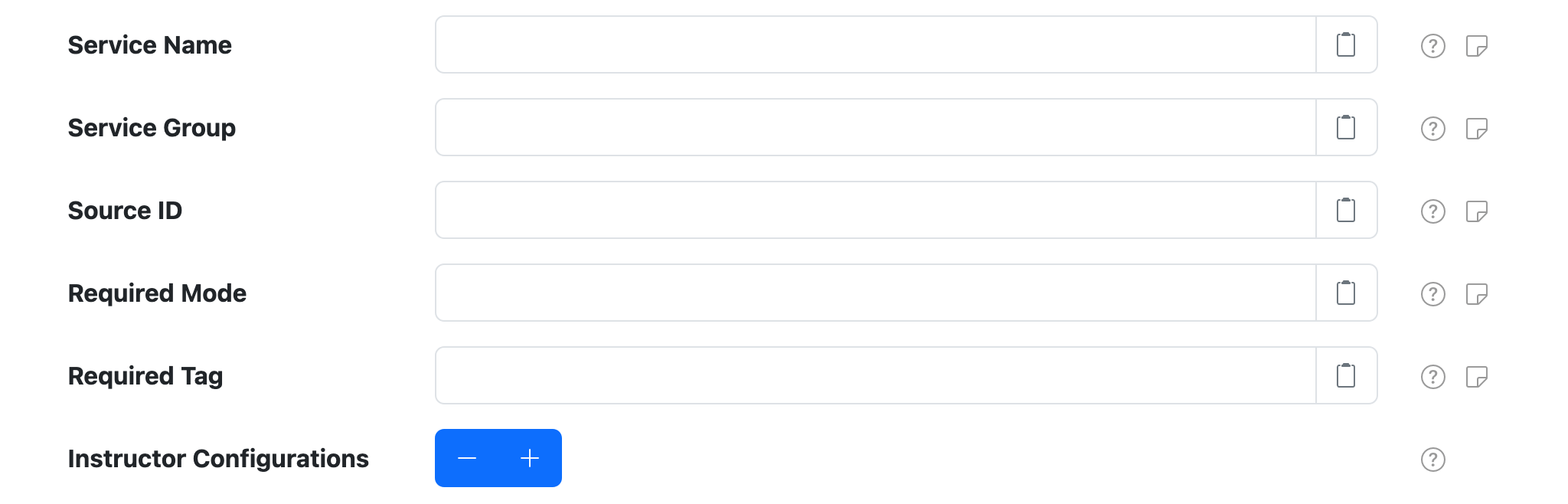
In addition to the Common Settings, the following general settings are available:
| Setting | Description |
|---|---|
| Instructor Configurations | A list of instructor configurations. Use the + and - buttons to add/remove as many configurations as you need. |
Instructor settings

Each Instructor Configuration supports the following settings:
| Setting | Description |
|---|---|
| Predicate | The expression that must evaluate to true to generate the configured instructions. |
| Expression Language | The expression language to write Predicate in. |
| Instructions | A list of instruction configurations. Use the + and - buttons to add/remove as many configurations as you need. |
Instruction settings

Each Instruction Configuration supports the following settings:
| Setting | Description |
|---|---|
| Instruction Topic | The instruction topic to generate. |
| Instruction Parameters | An optional list of instruction parameter configurations. Use the + and - buttons to add/remove as many configurations as you need. |
| Result Expressions | An optional list of instruction result expression configurations. Use the + and - buttons to add/remove as many configurations as you need. |
Instruction Parameter settings

Each Instruction Parameter Configuration supports the following settings:
| Setting | Description |
|---|---|
| Parameter Name | The instruction parameter name to use. |
| Parameter Value | The instruction parameter value. Can be an expression if Parameter Expression Language is also configured. |
| Parameter Expression Language | The expression language Parameter Value is written in, or omit to treat Parameter Value as plain text. |
Result Expression settings
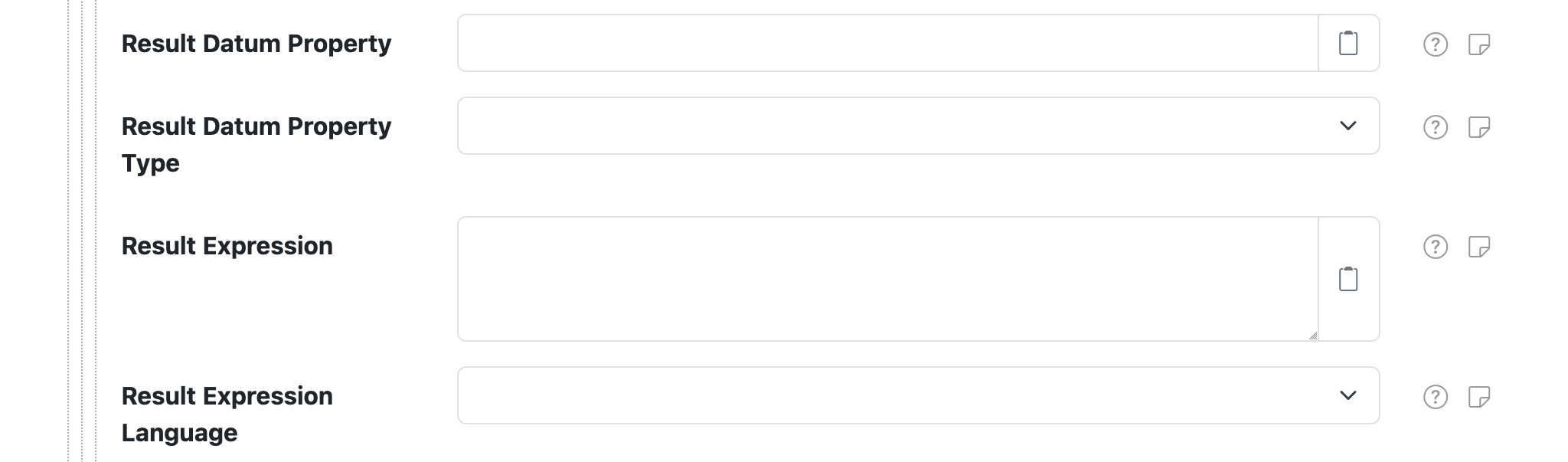
Each Result Expression Configuration supports the following settings:
| Setting | Description |
|---|---|
| Result Datum Property | A datum property name to save the expression result to. Leave empty to evaluate the expression without saving any datum property. |
| Result Datum Property Type | The datum property type to save the expression result as, if Result Datum Property also configured. |
| Result Expression | The expression to evaluate. |
| Result Expression Language | The expression language Result Expression is written in. |
Expressions
The Predicate and Parameter Value expresions are normal datum expressions. The Result Expression also includes the following additional variables:
| Variable | Type | Description |
|---|---|---|
instruction |
The Instruction object that was issued. | |
instructionResult |
If the instruction was successfully issued, the Instruction Status object with the result status and any result parameters generated. |
For example, you could generate a datum property based on the success of the executed instruction with a Result Expression like:
has('instructionResult') && instructionResult.completed
CSV Configurer
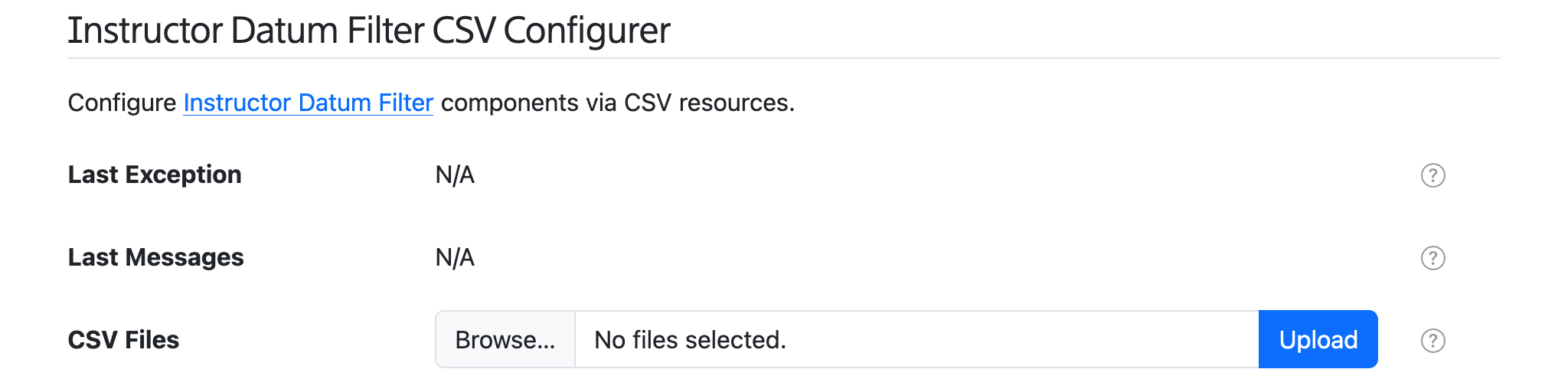
This component provides an Instructor Datum Filter CSV Configurer service that appears on the Settings > Services page. This service lets you upload an Instructor Datum Filter CSV Configuration file to configure all Instructor Datum Filter components, without having to use the settings form directly.
Spreadsheet jumpstart
You can copy the Instructor Filter Configuration Example sheet as a starting point. This sheet has drop-down menu validation to make it super easy to configure your Instructor components. Download your completed Sheet as a CSV file, then use the Instructor Datum Filter CSV Configurer form to upload the CSV file and configure SolarNode.
CSV Configuration Format
The Instructor Datum Filter CSV Configuration uses the column structure detailed
below. A header row is required. Comment lines are allowed, just start the
line with a # character (i.e. the first cell value). The entire comment line will be ignored.
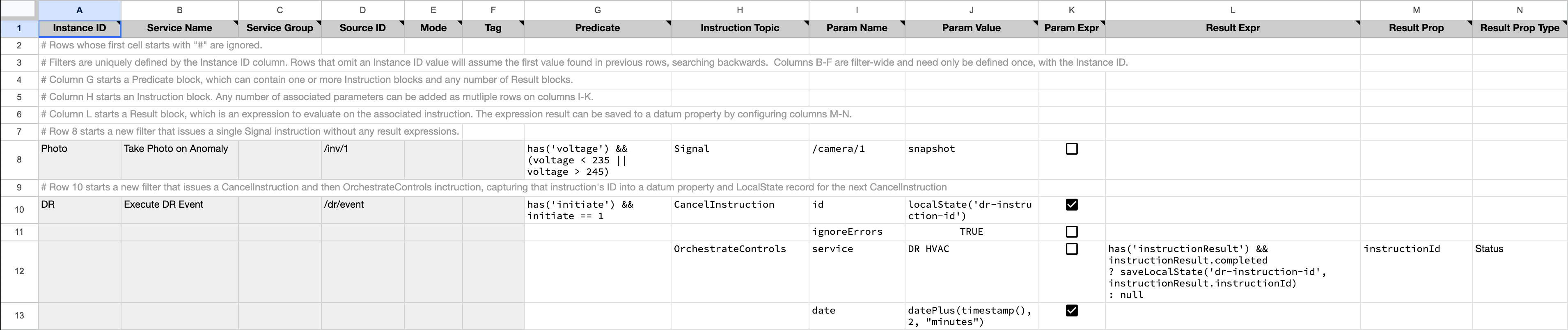
Here's an example screen shot of a configuration in a spreadsheet application. It is for two scenarios:
- Scenario
Phototests avoltageproperty is outside a range, and then issues aSignalinstruction to a/camera/1device to take a photo. - Scenario
DRwatis for aninitiateproperty to equal1, and then issuesCancelInstructionandOrchestrateControlsinstructions to handle a demand response event.
Spreadsheet applications generally allow you to export the sheet in the CSV format, which can then be loaded into SolarNode via the CSV Configurer.
Instance identifiers
Individual Instructor components are defined by the first column (Instance ID). You can
assign any identifier you like (such as Photo, DR, and so on) or configure as a single
dash character - to have SolarNode assign a simple number identifier. Once an Instance ID has been
assigned on a given row, subsequent rows will continue the configuration for that instance, until
a new Instance ID is encountered.
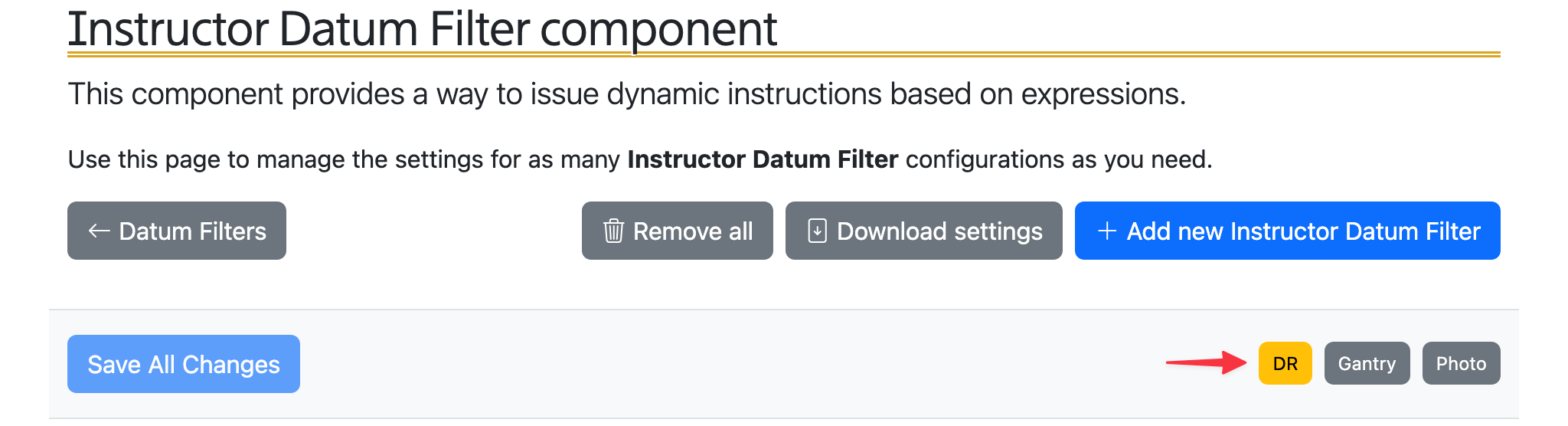
Here's an example of how 3 custom instance IDs DR, Gantry, and Photo appear in the
SolarNode UI:
CSV column definition
The following table defines all the CSV columns used by Instructor Datum Filter CSV Configuration. Columns A - F apply to the entire Instructor Datum Filter configuration, and only the values of those cells from the row that defines a new Instance ID will be used to configure the instance. Thus you can omit the values from these columns in subsequent rows used to configure the same instance.
- Each instance can be configured with any number of instruction rows, based on column H (Instruction Topic).
- Each instruction can be configured with any number of parameter rows, based on columns I-J (Parameter Name and Parameter Value).
- Each instruction can be configured with any number of result expression rows, based on columns L-N (Result Expression, Result Property, and Result Property Type).
| Col | Name | Type | Description |
|---|---|---|---|
A |
Instance ID | string | The unique identifier for a single Instructor Datum Filter component. Can specify - to automatically assign a simple number value, which will start at 1. |
B |
Service Name | string | A unique filter service name, to be referenced by other components. |
C |
Service Group | string | An optional service group. |
D |
Source ID | string | An optional case-insensitive pattern to match the input source ID(s) to filter. If omitted then datum for all source ID values will be filtered, otherwise only datum with matching source ID values will be filtered. |
E |
Mode | string | An optional operational mode that must be active for this filter to be applied. |
F |
Tag | string | Only apply the filter on datum with the given tag. A tag may be prefixed with ! to invert the logic so that the filter only applies to datum without the given tag. Multiple tags can be defined using a , delimiter, in which case at least one of the configured tags must match to apply the filter. |
G |
Predicate | string | The expression that must evaluate to true to generate the configured instructions. |
H |
Instruction Topic | string | The instruction topic to generate. |
I |
Parameter Name | string | The instruction parameter name to use. |
J |
Parameter Value | string | The instruction parameter value. Can be an expression if the Parameter Expression cell value is true. |
K |
Parameter Expression | boolean | true to treat the Parameter Value cell value as an expression. |
L |
Result Expression | string | An optional expression to evaluate after the instruction has been executed. |
M |
Result Property | string | An optional datum property name to save the Result Expression result to. Leave empty to evaluate the expression without saving any datum property. |
N |
Result Property Type | enum | The type of datum property to use for Result Property. Must be one of Instantaneous, Accumulating, Status, or Tag, and can be shortened to just i, a, s, t. |
Note
The SpEL Experssion Language is assumed for all expressions in the CSV based configuration.
Example CSV
Here is the CSV as shown in the example configuration screen shot above (comments have been removed for brevity):
Instance ID,Service Name,Service Group,Source ID,Mode,Tag,Predicate,Instruction Topic,Param Name,Param Value,Param Expr,Result Expr,Result Prop,Result Prop Type
Photo,Take Photo on Anomaly,,/inv/1,,,has('voltage') && (voltage < 235 || voltage > 245),Signal,/camera/1,snapshot,FALSE,,,
DR,Execute DR Event,,/dr/event,,,has('initiate') && initiate == 1,CancelInstruction,id,localState('dr-instruction-id'),TRUE,,,
,,,,,,,,ignoreErrors,true,FALSE,,,
,,,,,,,OrchestrateControls,service,DR HVAC,FALSE,"has('instructionResult') && instructionResult.completed
? saveLocalState('dr-instruction-id', instructionResult.instructionId)
: null",instructionId,Status
,,,,,,,,date,"datePlus(timestamp(), 'PT2M')",TRUE,,,
Example: Vehicle Gate Control
Imagine a vehicle service garage, where vehicles enter and leave a maintenance bay in one direction. When a vehicle enters and stops in the bay, a safety gate should close behind the vehicle, so another vehicle cannot enter the same bay. When the vehicle later drives away and leaves the bay, the safety gate should open behind the vehicle.
Also, when a vehicle enters the bay, the safety gate should only close if the vehicle stays in the bay for at least 2 minutes. Sometimes a vehicle enters a bay but does not stop, and as the gate is a bit slow to close and re-open, the maintenance crew does not want to be forced to wait unless a vehicle really is staying in the bay for mainenance. After a vehicle leaves the bay, the gate should go up 20 seconds later.
Now imagine a SolarNode is deployed on site, and connected to a sensor detects when a vehicle is
present in the bay and activates a "present" signal that SolarNode reads as a 1 value. When no
vehicle is present in the bay the sensor signal reads as a 0 value. Essentially SolarNode has a
datum stream that looks like this:
{
    "sourceId": "/vehicle/presence",
    "timestamp": "2026-07-14T12:00:00Z",
    "isPresent": 1 // (1)!
}
- Will be
1when a vehicle is present, or0otherwise.
An Instructor Datum Filter can be configured on this datum stream, and use Predicate expressions
to detect changes in the isPresent property and issue instructions to make the gate go up or down,
as appropriate. For this example we will assume two Control Conductor
components are configured, named Motor Down and Motor Up, that have the logic necessary to make
the gate go down and up, respectively. The logic will be configured with 2 Instructor Configurations:
one for the "go down" logic and another for the "go up" logic. LocalState
records are used to maintain state between executions of the Instructor.
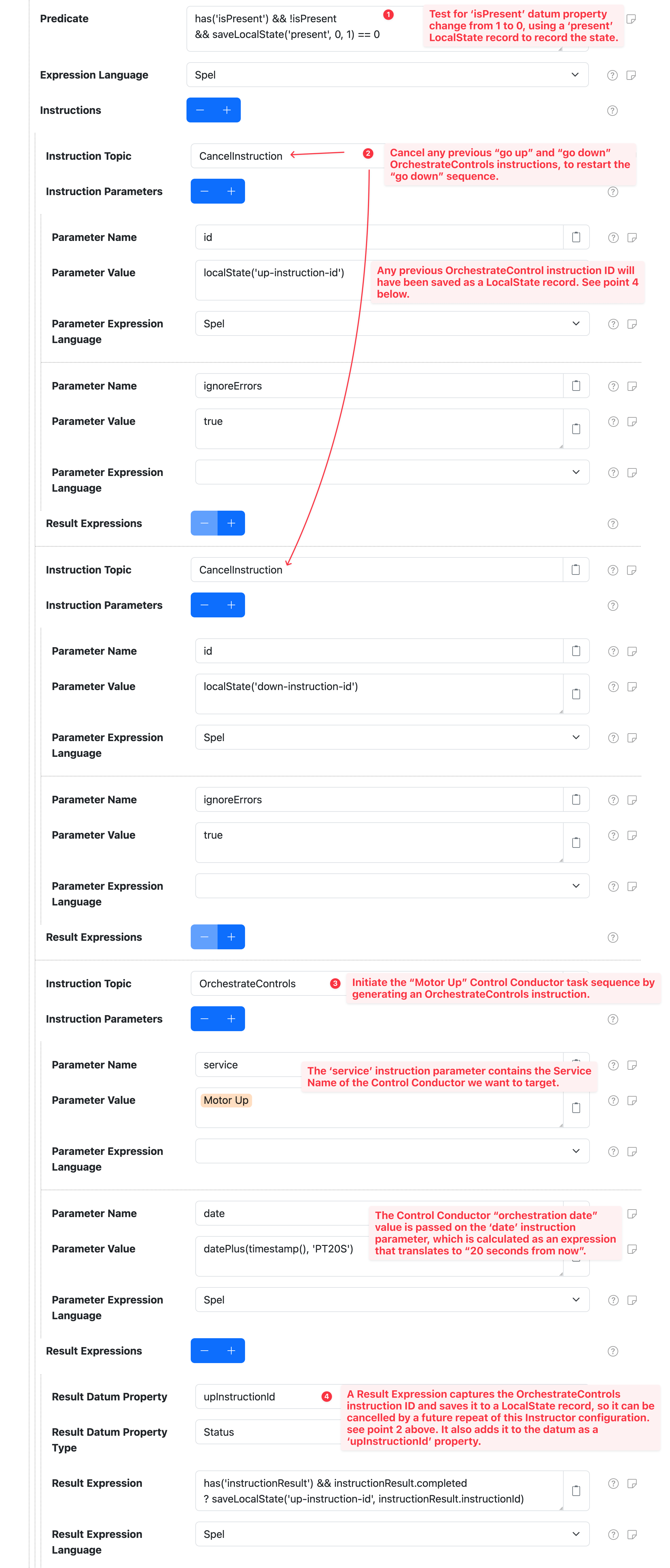
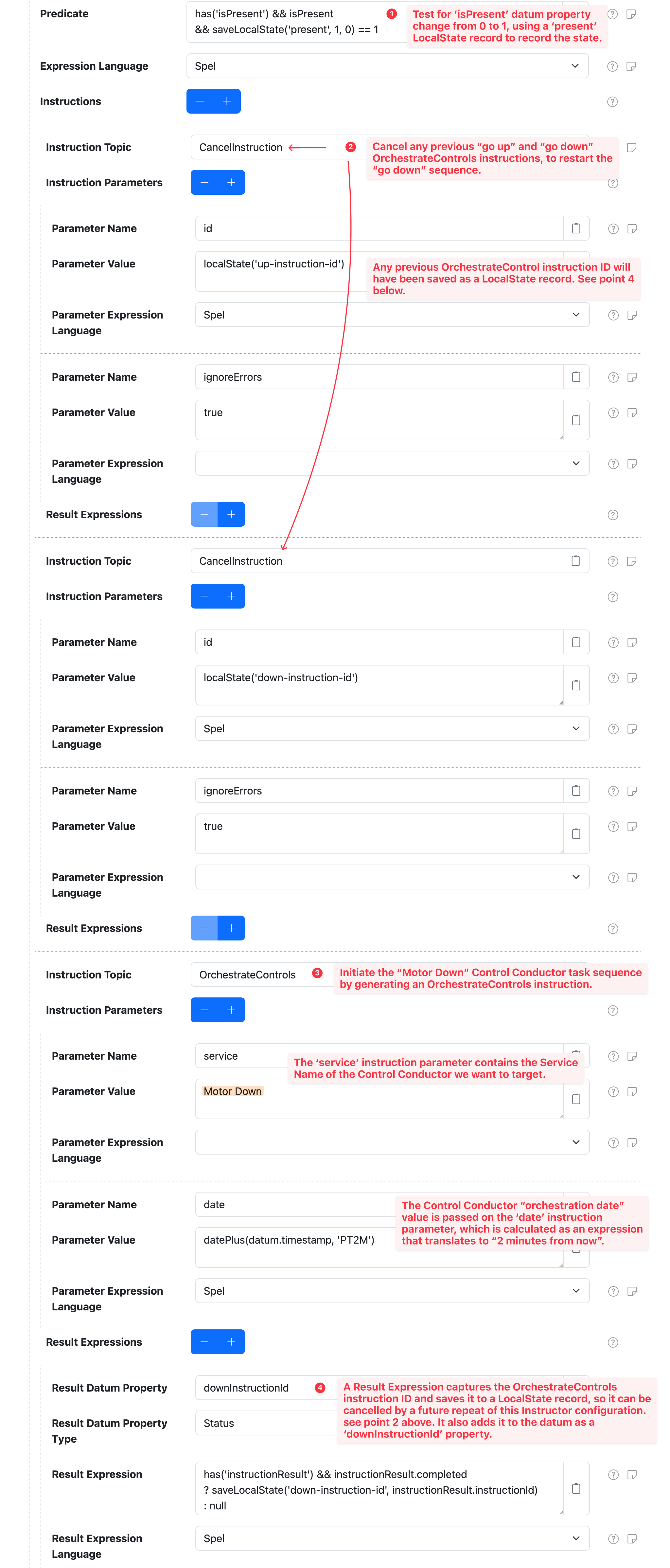
- Predicate: test for a change on the
isPresentproperty from0to1with the help of apresentLocal State record. - If the predicate is true, issue
CancelInstructioninstructions for any previous "go up" and "go down" instructions. See item 4 below. - Initiate the "go down" sequence by issuing a
OrchestrateControlsinstruction for theMotor DownControl Conductor component. Thedateinstruction parameter is calcualted to be 2 minutes in the future. - Capture the
OrchestrateControlsinstruction ID and save to adown-instruction-idLocal State record. See item 2 above.
- Predicate: test for a change on the
isPresentproperty from1to0with the help of apresentLocal State record. - If the predicate is true, issue
CancelInstructioninstructions for any previous "go up" and "go down" instructions. See item 4 below. - Initiate the "go up" sequence by issuing a
OrchestrateControlsinstruction for theMotor DownControl Conductor component. Thedateinstruction parameter is calcualted to be 20 seconds in the future. - Capture the
OrchestrateControlsinstruction ID and save to aup-instruction-idLocal State record. See item 2 above.